
Supplier disputes dropped by 98%
As published by ScrollEngine, supplier disputes dropped by 98% after Goswasthya, an organic food brand…
Customer story · Building materials
HomeRun promises building materials, tools and hardware at the door in 60 minutes or less across Bengaluru, India. Its own fleet runs on ScrollEngine: live driver tracking, dispatch, route optimization and automatic customer updates.
2,000+ merchants trust us (as of Oct 2026)100+ merchants rate us 5.0 stars on the Shopify App Store (as of Oct 2026)
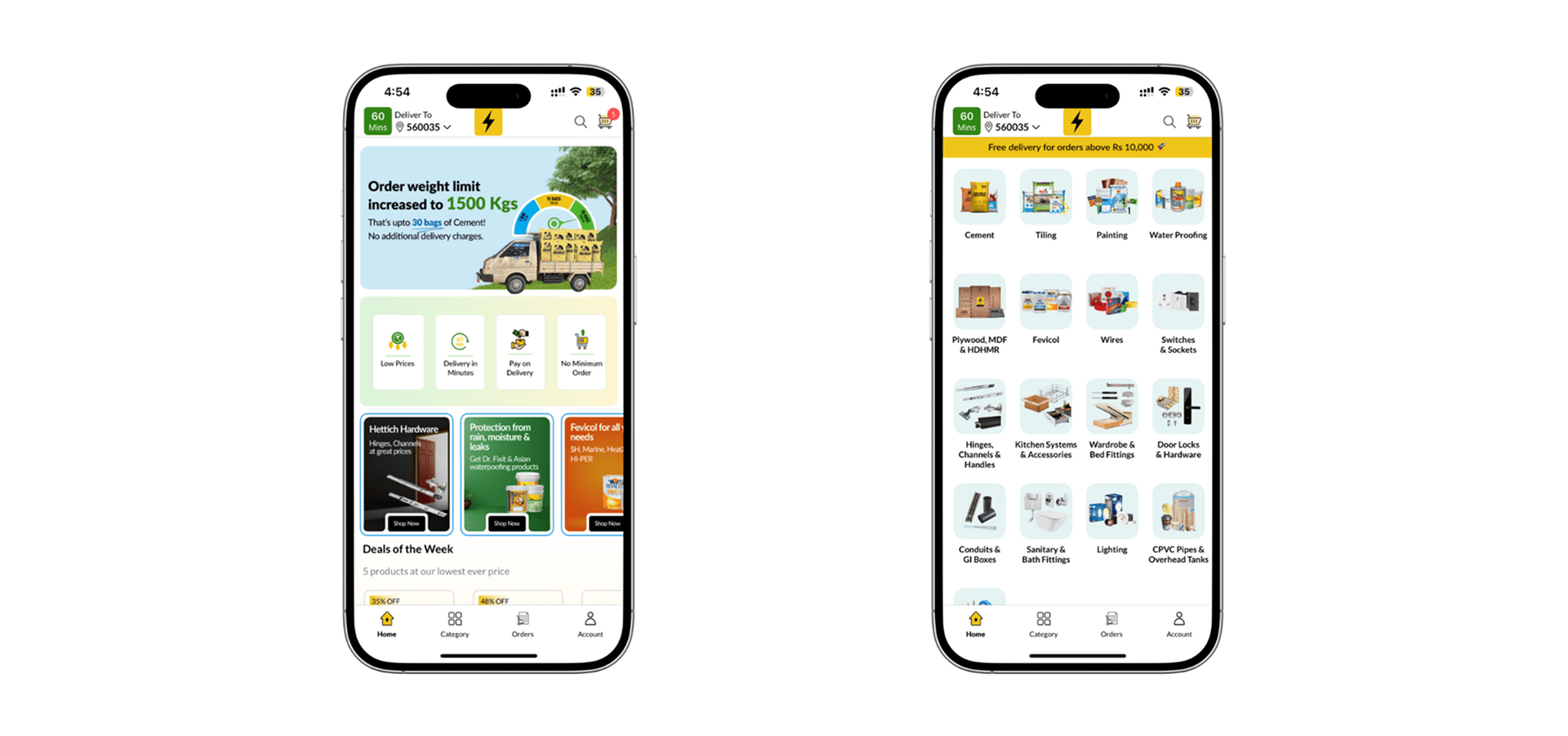
HomeRun delivers building materials, tools, fittings and hardware to contractors across Bengaluru, India, and promises them at the door in 60 minutes or less. It runs its own delivery fleet instead of relying on third-party aggregators, and that fleet runs on ScrollEngine: drivers are tracked live, orders are offered to nearby drivers through automated dispatch (early access), routes are optimized, and customers get an update at every step. As published by ScrollEngine, HomeRun fulfills orders with consistent 60-min SLAs.
Picture a contractor halfway through a renovation who runs short of fasteners or tile adhesive. Without HomeRun, the job stops while someone drives to a store. With HomeRun, they order in the app and keep working, which only holds if the order really arrives within the hour.
Every order sets that clock running again, and the operations team has to answer five questions, fast, while traffic and the list of available drivers change all day. Here is each question, and what answers it in ScrollEngine:
Done by hand, each of these questions puts the promise at risk. HomeRun answers them in software.
From the moment an order is confirmed, ScrollEngine tracks the available drivers in real time. With automated dispatch Early access, it offers the order to nearby on-duty drivers, ranked by cost and load, and whichever driver accepts first takes it. The choice shows up at once in the HomeRun app and in the operations dashboard. Automated dispatch runs on rules from the ScrollEngine web dashboard; see routes and dispatch for how it fits with route planning and direct assignment.
Route optimization plans each driver's path to the pickup point and on to the delivery address, and the team can change a route while it is running.
Customers follow their driver on a live map, with an ETA that updates as the driver moves. Automatic updates reach them in the HomeRun app and on WhatsApp at every step: order confirmed, driver assigned, out for delivery, estimated arrival and delivered. More on the customer side is in tracking and customer updates.
From the ScrollEngine web dashboard, HomeRun's team assigns drivers by zone and shift, follows each driver's performance on driver scorecards, sees at-risk deliveries as they happen, reroutes and reassigns orders, and reviews each route's history.
As published by ScrollEngine, since adopting ScrollEngine HomeRun has been able to:
The same building blocks, with delivery zones and time slots at checkout, are on the local delivery app for Shopify page.
Read the full narrative in how ScrollEngine powers HomeRun's 60-minute delivery promise, and whether a store can run this kind of speed on Shopify in can we build quick commerce on Shopify?
Running a delivery promise with your own drivers? Book a demo and we'll show you dispatch and live tracking on your own orders.
Keep every driver visible, hand each order to a nearby free driver without phone calls, route the driver straight to the pickup point and the door, watch each order against its deadline, and update the customer at every step. HomeRun does this on ScrollEngine with a live driver map, automated dispatch (early access), route optimization, at-risk alerts and automatic app and WhatsApp updates.
Automated dispatch, in early access, offers each new order to nearby on-duty drivers in waves, ranked by cost and load, and whichever driver accepts first takes it. It runs on rules, from the ScrollEngine web dashboard, with a live board showing which drivers were notified and who accepted.
Yes. Customers follow their driver on a live map with an ETA that updates as the driver moves, and they get automatic updates by WhatsApp, SMS or email at each step. HomeRun's customers see this in the HomeRun app and on WhatsApp.
In the ScrollEngine web dashboard, not inside Shopify admin. Driver scorecards show each driver's deliveries, distance, time and utilization, next to the live driver map and each route's history.
Each result is quoted exactly as ScrollEngine first published it on scrollengine.com. Its baseline, period and method were not published with it.
Fulfill orders across 76 pin codes with consistent 60-min SLAs
Published on the original post on scrollengine.com, as seen .
Run a 70+ driver fleet with data-driven control and minimal overhead
Published on the original post on scrollengine.com, as seen .
Reduce failed deliveries and reassignments through smarter routing
Published on the original post on scrollengine.com, as seen .
promise ultra-fast deliveries of building materials, tools, fittings, and hardware in 60 minutes or less
Published on the original post on scrollengine.com, as seen .
Customer stories
Supplier disputes dropped by 98%
As published by ScrollEngine, supplier disputes dropped by 98% after Goswasthya, an organic food brand…

20% Fewer Delivery Errors
Vendors Brooklyn, which delivers bulk meals and food to corporate offices in Brooklyn, NY…
40% Faster Dispatch
“Excellent speed, customization, updates, and 100% will be the new go-to all-in-one shopify integrated courier-routing/ tracking/ customer success app.”
Request a quote for your stores, or book a demo and we'll map your locations, slots and routes with you.
2,000+ merchants trust us (as of Oct 2026)100+ merchants rate us 5.0 stars on the Shopify App Store (as of Oct 2026)