
Supplier disputes dropped by 98%
As published by ScrollEngine, supplier disputes dropped by 98% after Goswasthya, an organic food brand…
Customer story · Flowers and gifts
Regala Inflora, a premium floral and gifting brand on Shopify, offers each product only the delivery methods it allows: local delivery and pickup for fresh flowers, shipping for hampers. Incorrect delivery selections dropped drastically.
2,000+ merchants trust us (as of Oct 2026)100+ merchants rate us 5.0 stars on the Shopify App Store (as of Oct 2026)

Regala Inflora gives every product on its Shopify store only the delivery methods that product can really use. Fresh bouquets offer local hand delivery and store pickup, gift hampers offer nationwide shipping, and the cart shows any other method as unavailable. The brand set this up with product-wise delivery rules in ScrollEngine, and incorrect delivery selections dropped drastically.
Regala Inflora is a premium gifting and floral brand known for its arrangements, artisanal hampers and personalized experiences. Built on Shopify, it offers three ways to receive an order:
As the range expanded, each product brought its own fulfillment needs, from same-day hand-delivered bouquets to carefully packed hampers shipped across the country. Managing that mix by hand was becoming slow and prone to human error.

Regala Inflora's store offered the same delivery methods for every product. As the range grew, that stopped fitting, because the products needed different things:
| Product | What it needs |
|---|---|
| Fresh flower bouquets | Local, same-day hand delivery to protect freshness |
| Gift boxes and hampers | Nationwide shipping |
| Some collections | In-store pickup only |
With one setup for all of them, checkout showed shoppers methods that did not apply to what they were buying. A customer could see "Standard Shipping" for a fresh bouquet and choose it. The operations team then had to contact customers to correct orders after purchase, which caused delays and extra work.
The brand needed delivery rules that worked product by product and applied themselves at checkout, without changing the experience for shoppers.
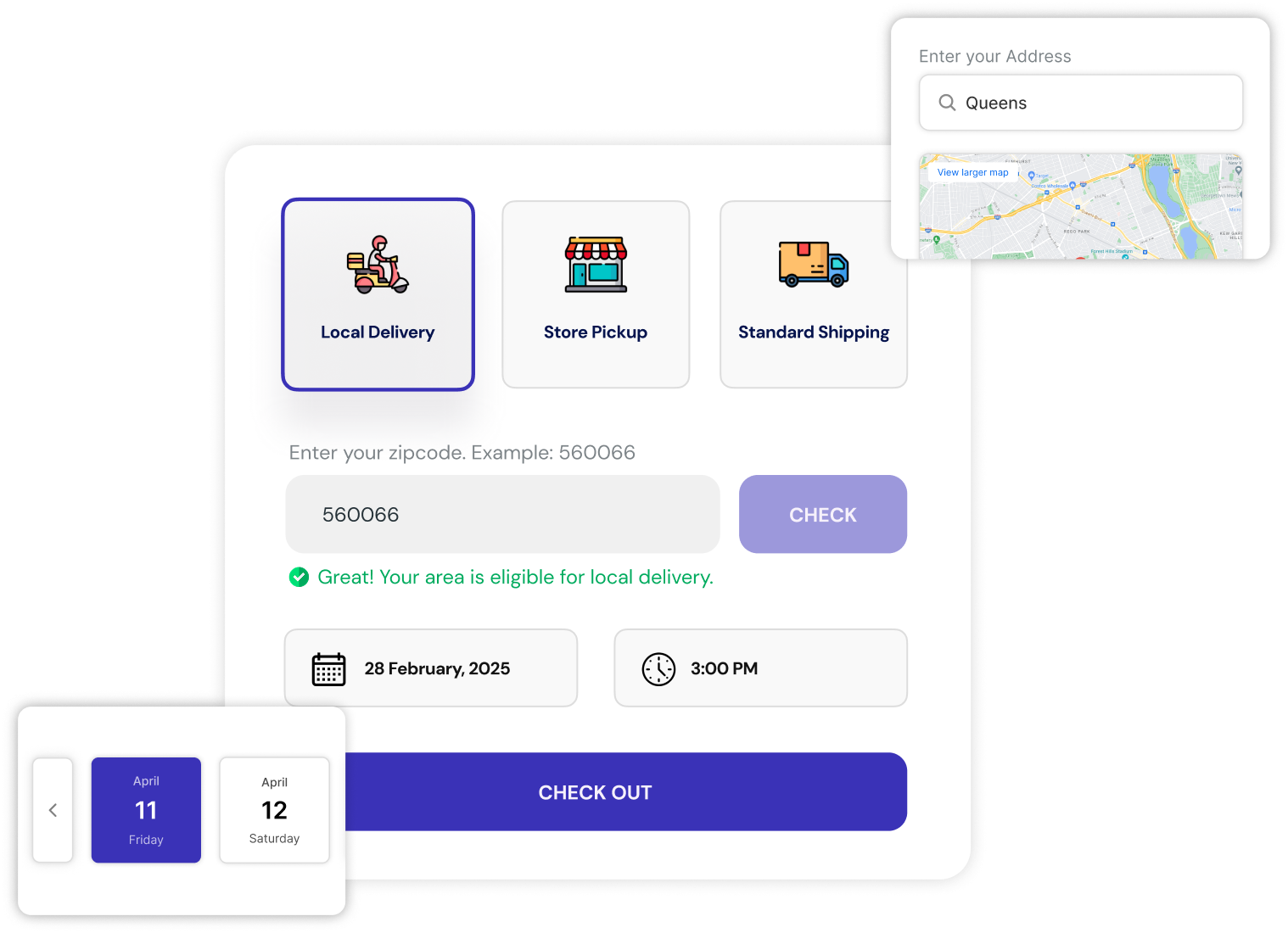
ScrollEngine developed product-based delivery restrictions for Regala Inflora and configured them with the team. In the app today they are called product-specific profiles. The setup has three parts.
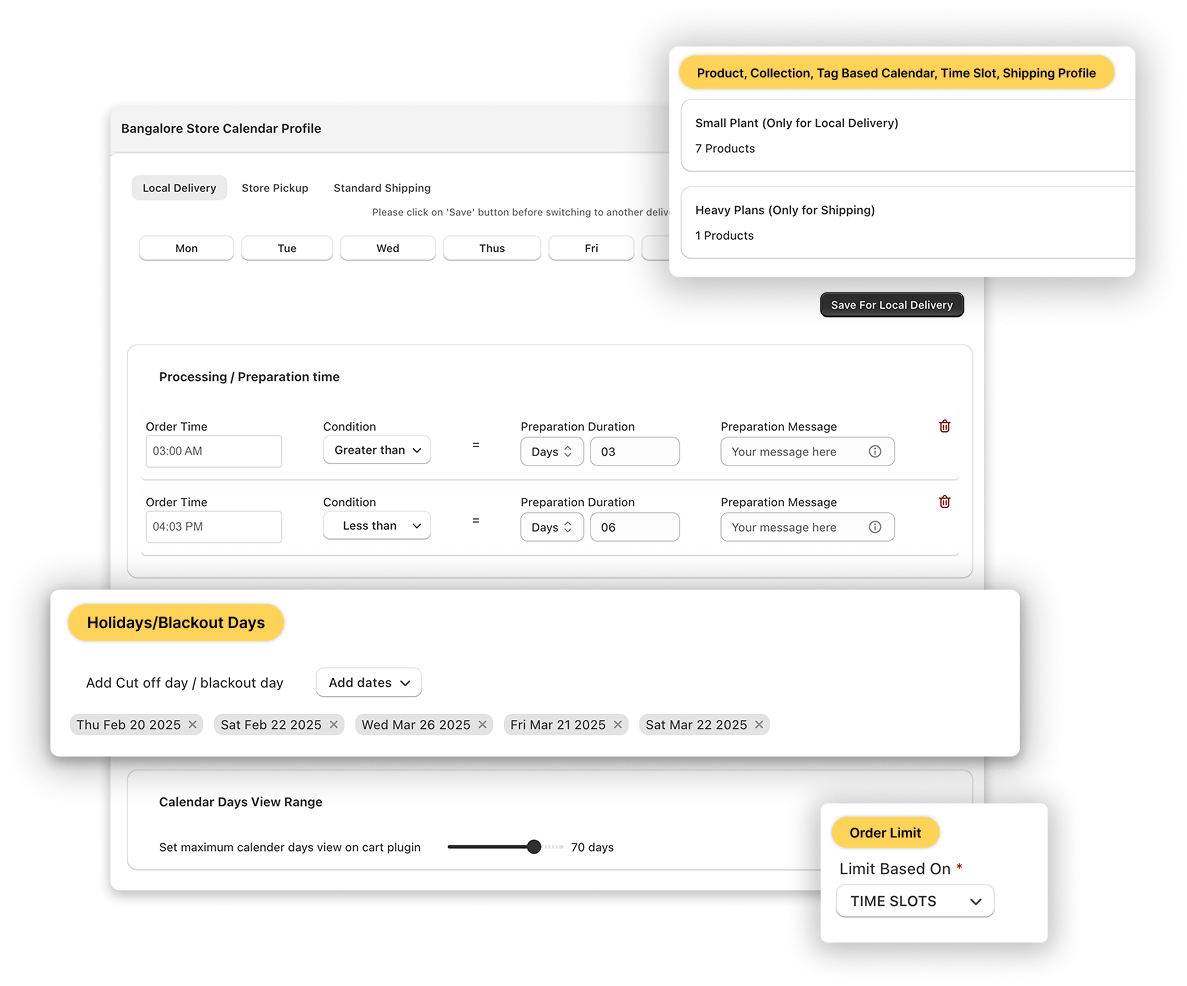
A product-specific profile holds a group of products, chosen by product, collection or tag. Any product that isn't in a profile follows the store's general profile, so the store-wide setup stays as it was.
Each profile has its own calendar: delivery dates, preparation times and blackout days. A same-day bouquet and a shipped hamper no longer share one set of rules.
The delivery and pickup widget reads each product's profile. A bouquet in the cart offers local delivery with a postcode check and delivery dates, and shows national shipping as unavailable. Shoppers can only pick a method that suits what they ordered.
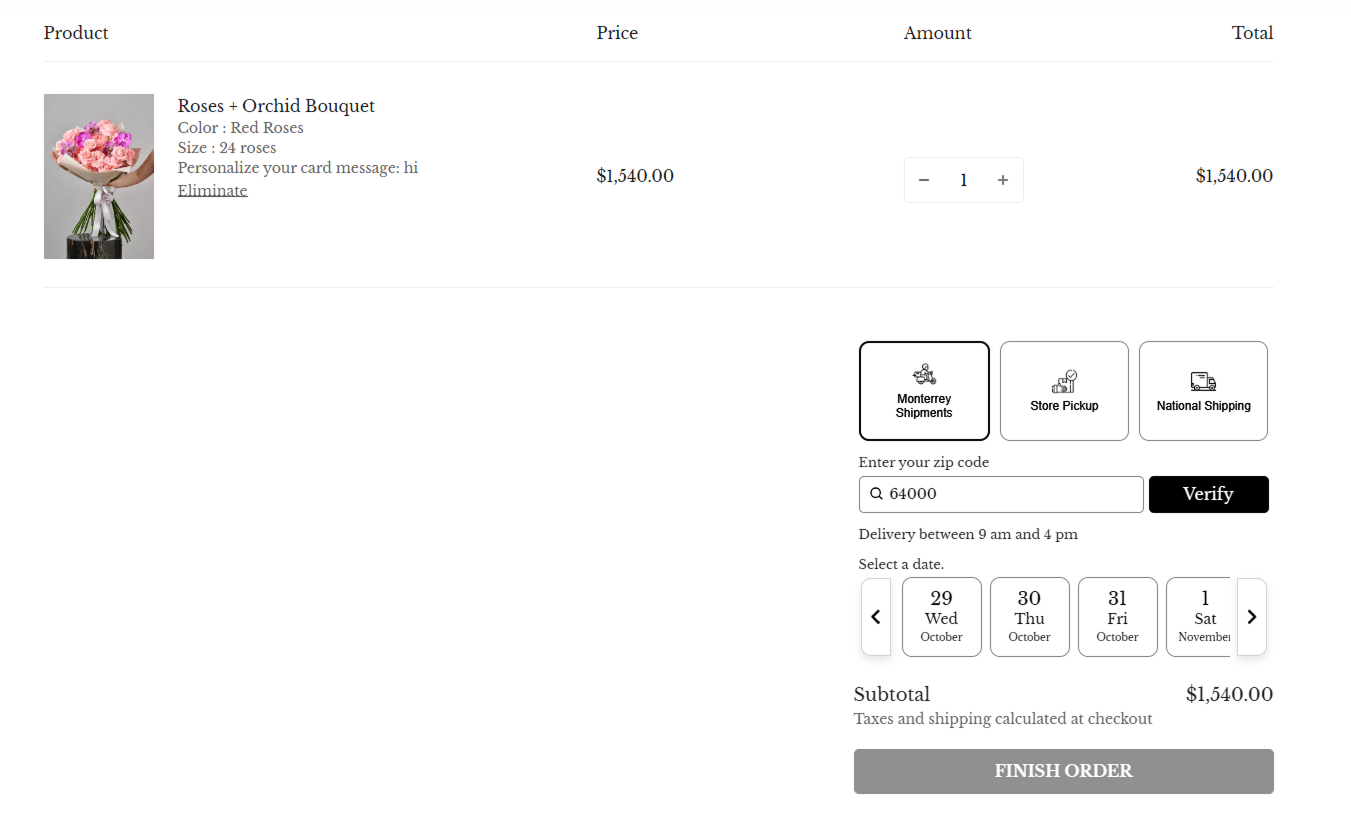
Only the delivery options that apply to the product are offered.
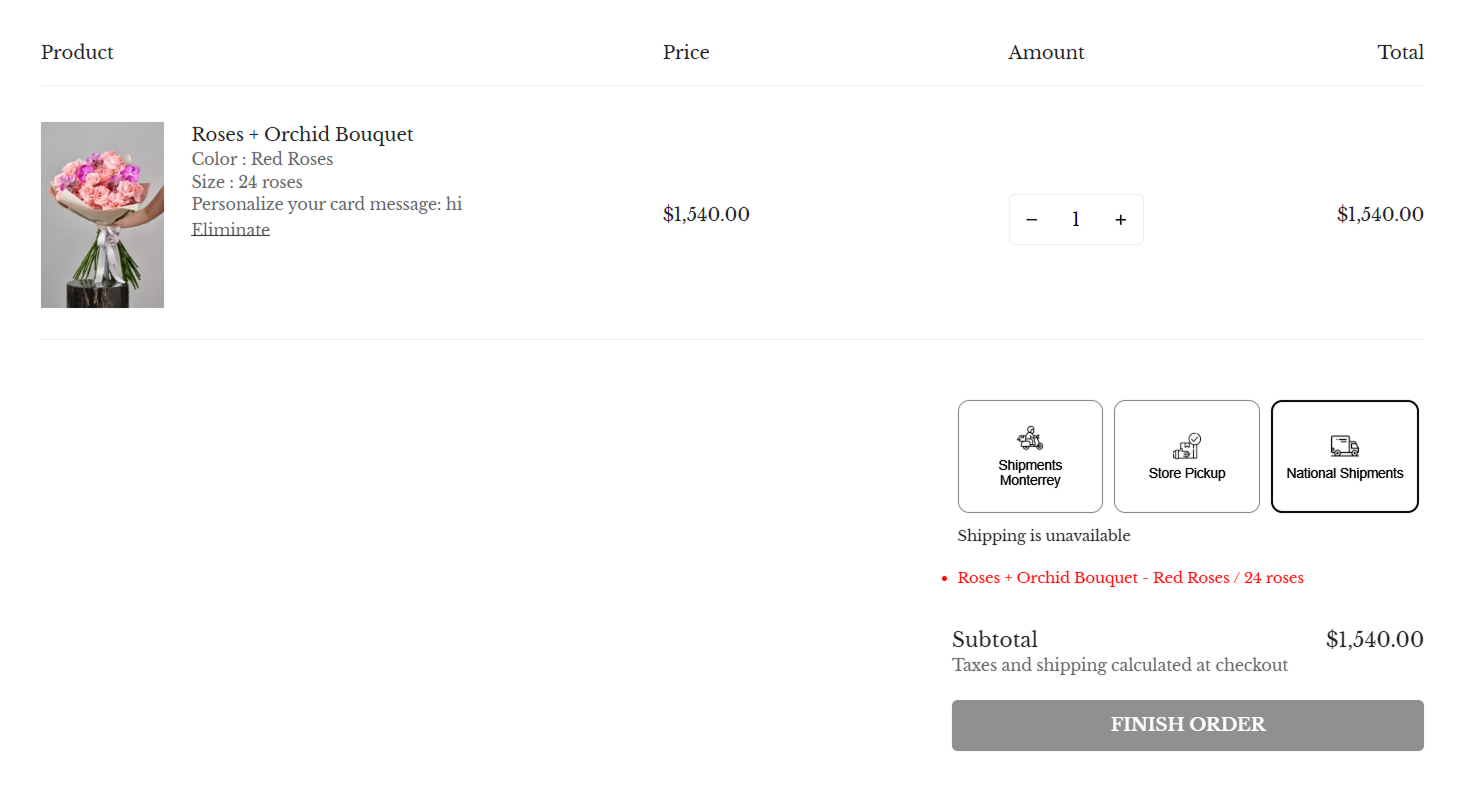
Methods that don't apply are clearly marked as unavailable at checkout.
After the change, Regala Inflora's fulfillment process became more organized and efficient.
The operations team no longer validates each order by hand. Every incoming order already matches the correct delivery method, so there is much less back-and-forth with customers.
Incorrect delivery selections dropped drastically, saving time and preventing costly logistical mistakes, especially for fragile and time-sensitive products.
Customers see only the methods that are available and suitable for the products they ordered, and timely notifications keep them updated as each order moves.
As the catalog expands, the team adds new categories to a profile or adjusts its delivery options whenever it needs to, without custom code or third-party scripts.
You can copy Regala Inflora's approach in five steps:
If pickup is one of your methods, set your stores and hours with store pickup before you test.
Today Regala Inflora delivers across multiple regions with confidence: a fragile floral arrangement and a premium gift hamper each reach the recipient through the most suitable channel. As new collections arrive, they slot into an existing profile or get one of their own.
Florists face their hardest test on peak days. For capacity planning around them, read the merchant's guide to managing Mother's Day deliveries. For how product-level rules handle special delivery dates, time slots and carts that mix products, read our product story Enabling Product-Level Delivery Control Without Compromising Store-Wide Logic.
Yes. Shopify Help describes a shipping profile as a set of shipping rules for specific products and locations (as of Oct 2026). To decide which methods a product offers in the cart, such as local delivery and store pickup for fresh flowers but shipping for hampers, each with its own dates, Regala Inflora uses product-specific profiles in ScrollEngine.
Put fresh flowers in their own product-specific profile with only local delivery and store pickup turned on. The cart then offers those methods for the bouquet and shows shipping as unavailable, so the order arrives with a method you can actually fulfil.
They follow the general profile: the store-wide delivery methods, zones, dates and time slots. You only build a profile for the exceptions, such as perishable bouquets or pickup-only collections.
In ScrollEngine, put those products in a product-specific profile with only store pickup turned on. The cart then offers store pickup for them, and methods that don't apply are marked as unavailable.
No. Regala Inflora's rules are settings in ScrollEngine, not custom code or third-party scripts, so the team adds new categories to a profile as the catalog grows.
Ready to give each product the delivery methods it needs? Install Local Delivery + Pickup Date:S from the Shopify App Store and set up your first product-specific profile.
Each result is quoted exactly as ScrollEngine first published it on scrollengine.com. Its baseline, period and method were not published with it.
Incorrect delivery selections dropped drastically
Published on the original case study on scrollengine.com, as seen .
Customer stories
Supplier disputes dropped by 98%
As published by ScrollEngine, supplier disputes dropped by 98% after Goswasthya, an organic food brand…

20% Fewer Delivery Errors
Vendors Brooklyn, which delivers bulk meals and food to corporate offices in Brooklyn, NY…
40% Faster Dispatch
“Excellent speed, customization, updates, and 100% will be the new go-to all-in-one shopify integrated courier-routing/ tracking/ customer success app.”
Request a quote for your stores, or book a demo and we'll map your locations, slots and routes with you.
2,000+ merchants trust us (as of Oct 2026)100+ merchants rate us 5.0 stars on the Shopify App Store (as of Oct 2026)