
How to Fix Shopify Local Delivery for Online Stores
To fix Shopify local delivery, find where it breaks: checkout, scheduling, routing…
Insights
A pickup date picker lets customers book a pickup date and time slot in the cart, so your store has orders ready before they arrive, spreads collections across the day and stops the counter from crowding at peak hours.

A Shopify pickup date picker lets customers book a pickup date and time slot in the cart, so your store knows when each order will be collected. Staff prepare orders before customers arrive, collections spread across the day instead of piling up at lunch and after work, and nobody waits at the counter while someone hunts for a bag.
Shopify's built-in pickup in store lets a customer choose a location and shows a processing time you set. Its Help Center page doesn't describe a way for customers to pick a pickup date or time (checked Oct 2, 2026). That gap is what a pickup date picker fills.

Pickup is growing fast. eMarketer forecasts U.S. click-and-collect retail sales of about $178 billion in 2026, up 15% year over year. eMarketer (via Capital One Shopping), Buy online, pick up in store statistics (Jun 2026)
Without scheduling, that growth lands on your counter all at once. Customers show up unannounced, some before their order is packed. Staff stop serving walk-in shoppers to search the back room. A queue forms at the busiest hours and the counter sits empty the rest of the day.
Scheduling fixes the timing problem at the source: the customer picks a time when they order, and your team plans around it.
Based on Shopify's Help Center page for pickup in store (checked Oct 2, 2026), here is what changes when you add a pickup date picker:
| Feature | Shopify built-in pickup | With a pickup date picker (ScrollEngine) |
|---|---|---|
| Customer chooses a store | Yes | Yes, with a store finder showing drive distance and time |
| Customer chooses a date and time slot | Not described | Yes, per store, in the cart, cart drawer or product page |
| When the order will be ready | A processing time you choose | Prep time and a same-day cutoff per store |
| Limit on pickups per slot | Not described | A capacity for each slot and day, per store |
| Closed days and holiday hours | Not described | Blackout dates and holiday hours per store |
| Ready notification | Ready for pickup email | Ready for pickup by email, SMS or WhatsApp |
A pickup date picker does much more than show a calendar. It brings structure to every pickup your store promises.
The right slot length and capacity come from your counter, not from a template. Work it out in three steps:
For example, if a handover takes about three minutes and two people work the counter, a 30-minute slot can take about 20 pickups. Leave some headroom for walk-in shoppers, then adjust after a busy week. Shorter slots spread arrivals more evenly; longer ones are friendlier to customers with unpredictable days.
Pickup capacity is separate from delivery capacity, so a full delivery day doesn't affect the counter.
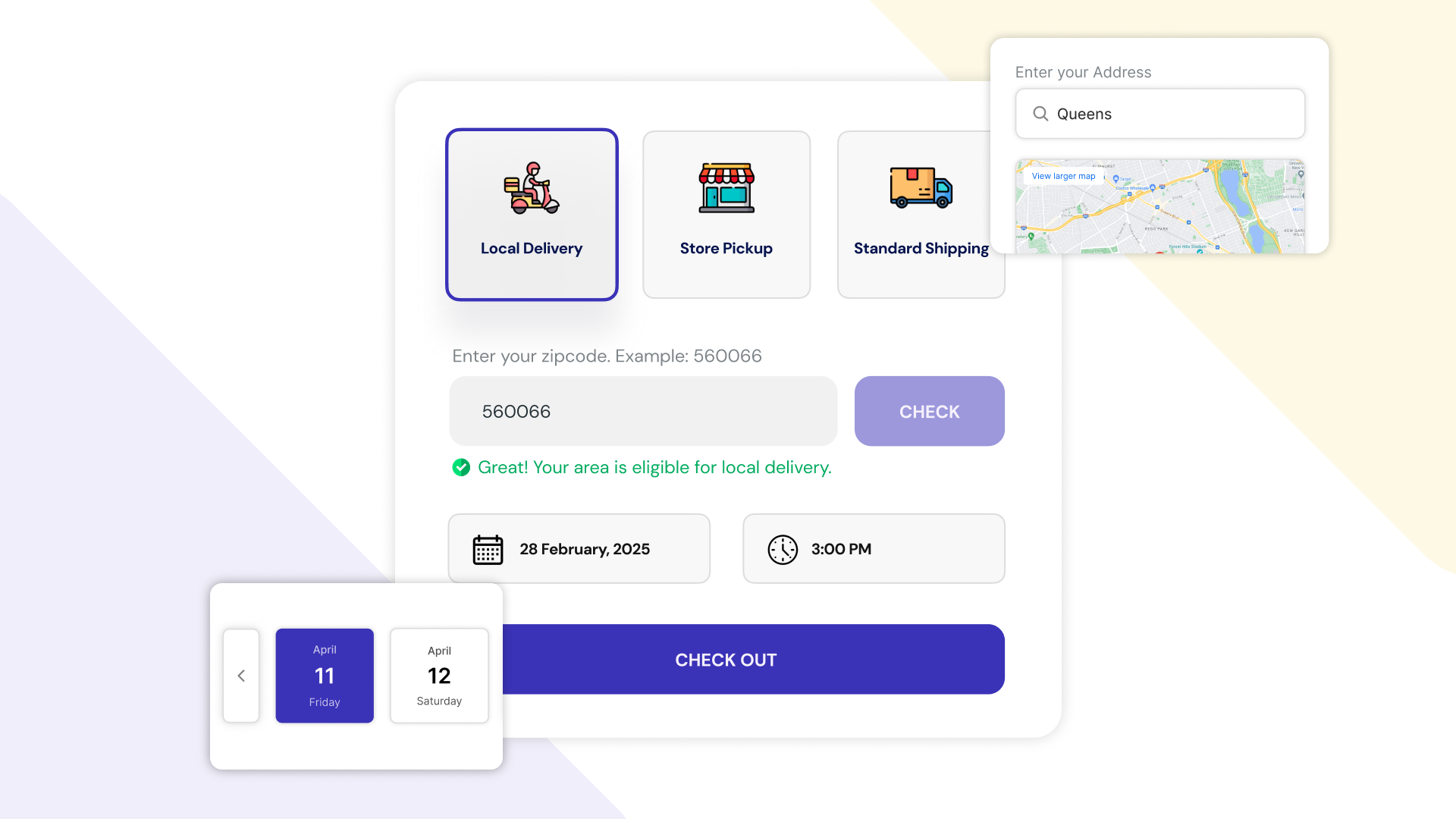
For your store:
For your customers:
If you run several locations, each store keeps its own pickup days, hours, slots and capacity in its own time zone. A store finder shows customers every location in a list, on a map or in a dropdown, with drive distance and time. Each store can warn the customer, or block pickup there, when it doesn't carry an item in the cart.
Staff can also change the date or slot on an order or draft order in Shopify admin when a customer calls to move their pickup. For sales made at the register, there is a POS tile to schedule pickup or delivery for an in-store sale Early access.
Three ScrollEngine merchants set up the cart widget and pickup tools in different ways:
As online and in-store shopping merge, scheduled pickup is a natural next step for local retailers. It fits beside delivery: the same calendar, the same customer updates, one view of the day. If you deliver too, see how smarter delivery scheduling helps local stores and the 5 best Shopify local delivery and store pickup strategies, or start from the Shopify guide to local delivery, pickup and scheduling.
ScrollEngine's Local Delivery + Pickup Date:S gives each of your stores a pickup calendar, slot limits, prep time and ready messages, alongside local delivery and routes when you need them. See the store pickup app for the details. Comparing pickup apps? See Zapiet vs ScrollEngine and Pickeasy vs ScrollEngine.
✨ Ready to streamline your in-store pickups? Start using ScrollEngine Local Delivery + Pickup Date:S today, with a 7-day free trial.
FAQ
Not with Shopify's built-in pickup in store, which lets customers choose a location and shows a processing time you set (Shopify Help Center, checked Oct 2, 2026). A pickup date picker app adds a calendar of pickup dates and time slots in the cart, per store.
Use shorter pickup slots and set a capacity for each one, based on how many orders your counter can hand over in that window. Lower the capacity on your busiest slots first, then check the change in your cart before the next busy day.
Prep time is the notice your store needs between an order and its pickup slot, for example two hours. A cutoff is the clock time after which same-day pickup closes, for example 3 pm. Together they decide the earliest slot a customer can book.
Yes. Each store gets its own pickup days, hours, slots and capacity in its own time zone, and a store finder shows customers each location with its drive distance and time.
In early access: staff can schedule a pickup or delivery for an in-store sale from a POS tile, and see orders by date. Because it is in early access, check with us that it fits your setup before you rely on it at the register.
From the blog
To fix Shopify local delivery, find where it breaks: checkout, scheduling, routing…
For stores that deliver locally or offer pickup, ScrollEngine, our app, puts slots, pickup, routes…
Shopify's built-in settings cover delivery zones and in-store pickup but not bookable dates…
Book a demo and we'll walk you through the platform set up like your stores, or request a quote for your locations and how you deliver.
2,000+ merchants trust us (as of Oct 2026)100+ merchants rate us 5.0 stars on the Shopify App Store (as of Oct 2026)