
The Shopify Merchant’s Guide to Managing Mother’s Day Deliveries
To handle Mother’s Day on Shopify, set daily and per-slot limits your team can meet…
Product news
To master BFCM deliveries, set slot limits and cutoffs weeks ahead, onboard drivers early, plan optimized routes from booked slots each morning and send tracking updates automatically. Black Friday 2026 is Nov 27; Cyber Monday is Nov 30.
Black Friday Cyber Monday (BFCM) turns a normal week of local deliveries into the hardest few days of the year. To get through it calmly, lock your delivery capacity and cutoffs weeks ahead, onboard drivers before the rush, plan optimized routes from the slots customers booked, and let automatic tracking updates answer "Where's my order?" before anyone asks. In 2026, Black Friday falls on Friday, November 27 and Cyber Monday on Monday, November 30.
The volume is real. Shopify reported that its merchants generated a record $14.6 billion in sales over BFCM weekend 2025, up 27% from the year before, and that more than 94,900 merchants had their highest-selling day ever on Shopify (Shopify, December 2, 2025).
For a store that delivers with its own drivers, every extra order needs a slot, a driver, a route and an update. Three things usually go wrong:
The cost of getting it wrong lasts long after the weekend: According to AlixPartners' 2026 Home Delivery Survey, 52% of shoppers will stop buying from a retailer after just one or two missed deliveries. AlixPartners, 2026 Home Delivery Survey (Jun 2026)
| Date | Day | What to plan for local delivery and pickup |
|---|---|---|
| Thursday, November 26 | Thanksgiving (US) | Block the day with a blackout date, or open only a few slots |
| Friday, November 27 | Black Friday | Extra slots and driver shifts for the weekend that follows |
| Saturday, November 28 | Small Business Saturday | More pickup slots for shoppers who come in person |
| Monday, November 30 | Cyber Monday | Driver cover for Tuesday to Thursday, when Cyber Monday orders go out |
Everything downstream depends on what checkout promises, so start here.
Our holiday capacity planning guide covers each setting and the dates through Christmas Eve, and the help center shows how to set slot capacity limits.
Two more tools are there for stores that want them: automated dispatch Early access, which offers each new order to nearby on-duty drivers and gives it to whoever accepts first, and batching nearby orders into one trip Early access.
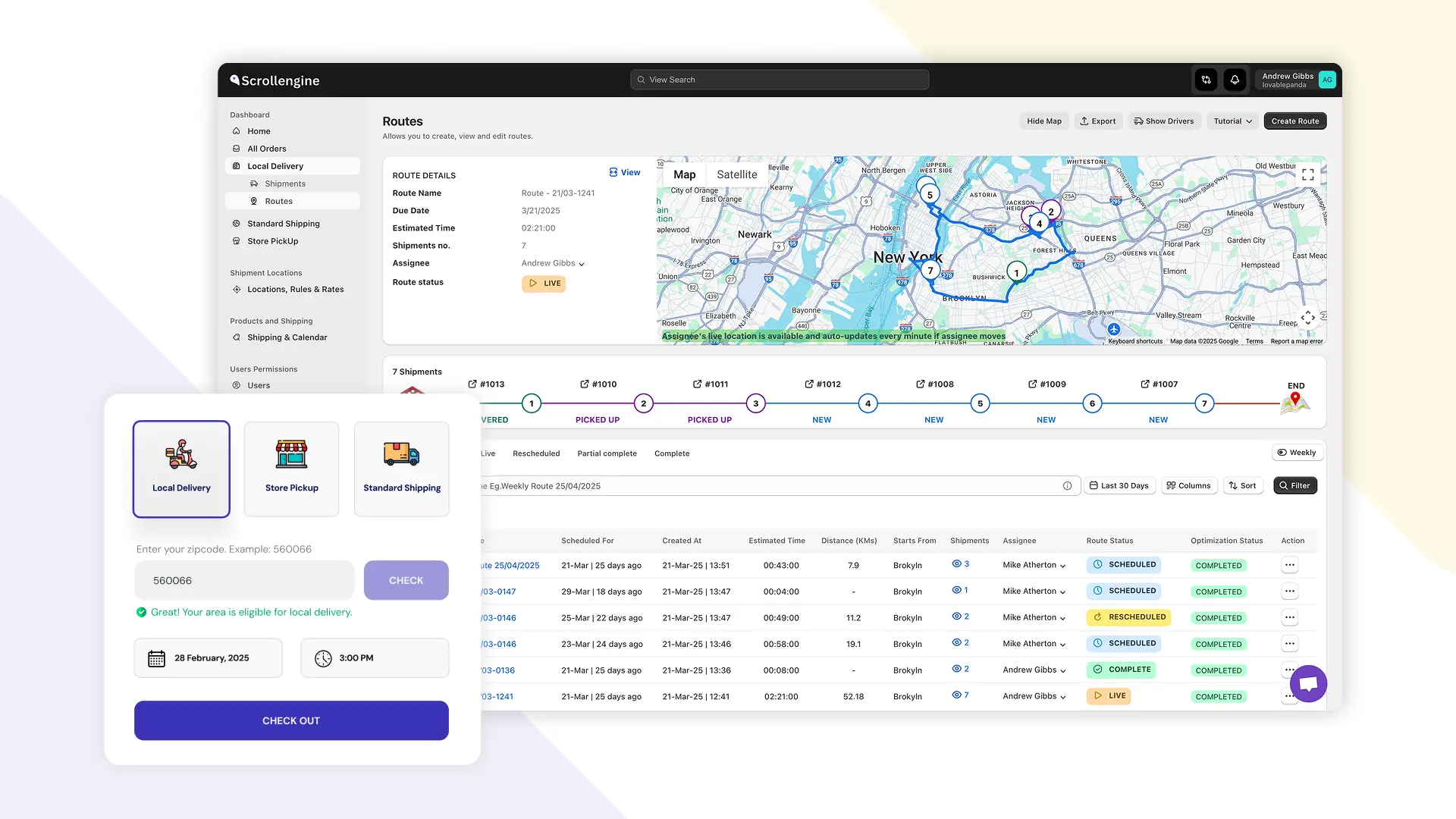
The routes dashboard and the cart widget, shown with demo data
Our guide to local delivery analytics shows what each number means and the change it should trigger.
If you have a store, pickup slots add capacity without adding drivers. Offer them next to delivery at checkout, each with its own limit, and let staff move orders through the pickup workflow (preparing, ready, picked up) in the ScrollEngine dashboard. When shoppers choose where to collect, the pickup store finder shows each store's drive distance and time. For a store directory on your site, our separate Store Locator app lists your locations with addresses and opening hours.
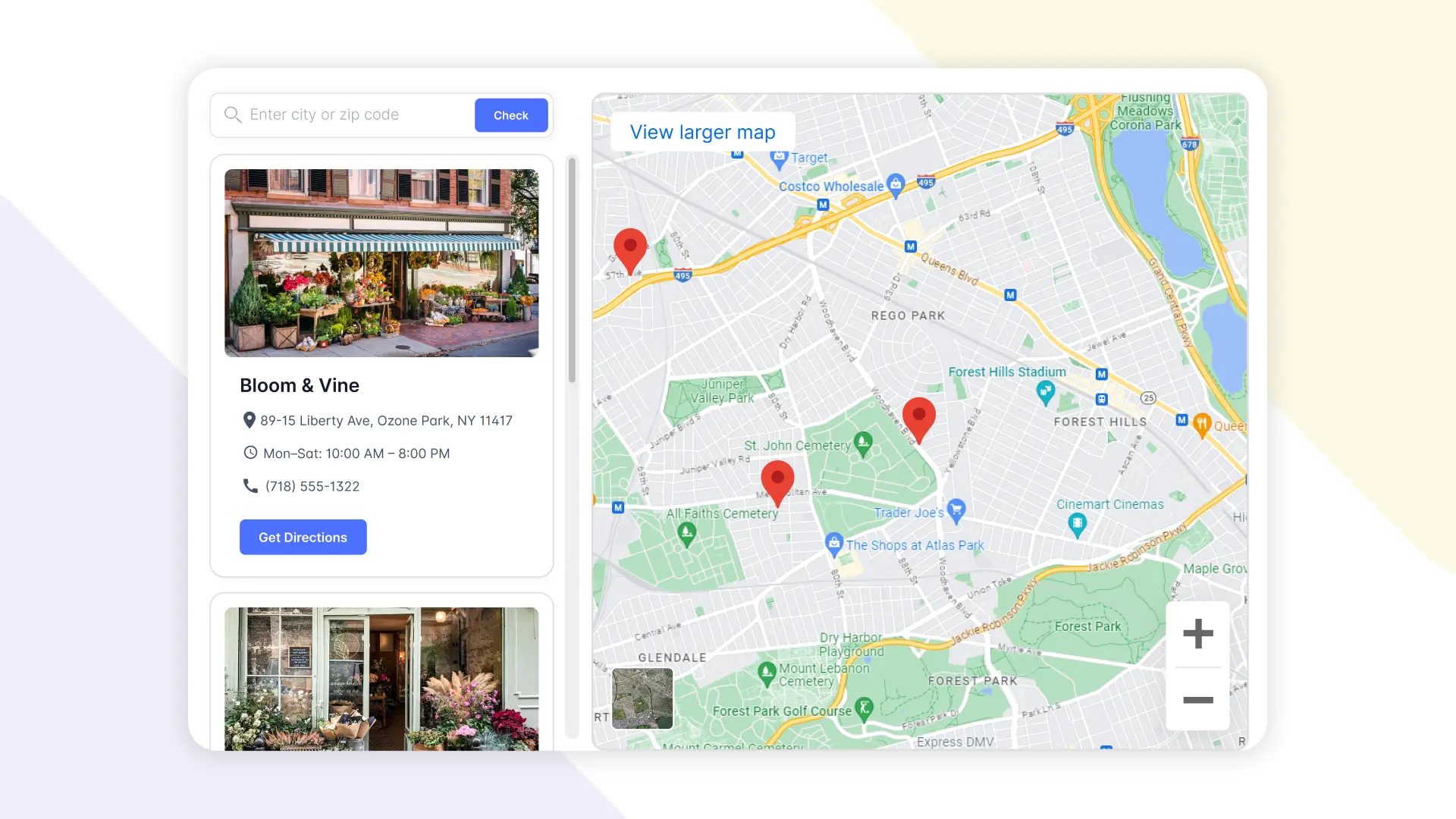
Store Locator
BestPerfume.Store, a fragrance retailer in Singapore, plans routes for several drivers a day with ScrollEngine. As published by ScrollEngine, its results are "40% Faster Dispatch" and "25% More On-Time Deliveries"; read its customer story for how it set up its routes. Decathlon Ghana uses ScrollEngine to calculate delivery charges and locations, and Canine Kitchen runs its local delivery on it. Planning a bigger jump than one weekend? Our local delivery scale strategies cover the longer climb.
BFCM preparation takes weeks, not hours: drivers need onboarding and slot limits need a test run. ScrollEngine's app, Local Delivery + Pickup Date:S, brings it together on Shopify: delivery and pickup slots with limits, route optimization, a driver app with proof of delivery, live tracking and automatic customer updates.
Install Local Delivery + Pickup Date:S and use the free trial of 7 days on the Shopify App Store to rehearse your BFCM day. Add Store Locator if you want a store directory on your site.
FAQ
Black Friday 2026 is Friday, November 27, the day after US Thanksgiving (Thursday, November 26). Small Business Saturday follows on November 28, and Cyber Monday is Monday, November 30.
Start four to six weeks out. Set a limit for every delivery and pickup slot and day at each location, move cutoffs earlier and add blackout dates. Two to three weeks out, onboard every driver on the driver app and run a test day. The week before, switch on tracking updates and publish your last delivery dates. Over the weekend, run the same daily loop: cutoff, optimize routes, dispatch, monitor, edit, close out with proof.
Send every customer a tracking link with a live ETA and automatic updates at each step (confirmed, out for delivery, delivered) by email, SMS or WhatsApp. Customers who can see where their order is have less reason to contact support. Publish your last order dates as well, so delivery-date questions are answered before checkout.
Yes. Set a limit for each slot and each day at every location based on the drivers and staff you'll actually have, not the orders you hope for, and lower it on days you're short-staffed. Setting limits weeks ahead lets you test them before the rush.
Yes. If you have a store, pickup slots add capacity without adding drivers. Offer them next to delivery at checkout, give each pickup slot its own limit, and send a ready-for-pickup message so customers arrive when their order is ready.
From the blog
To handle Mother’s Day on Shopify, set daily and per-slot limits your team can meet…
Most Shopify stores need five local delivery tools: zones and rates, a date and time slot picker with limits…
ScrollEngine, our app, covers delivery and pickup slots, routes, a driver app and tracking in one app.
Book a demo and we'll walk you through the platform set up like your stores, or request a quote for your locations and how you deliver.
2,000+ merchants trust us (as of Oct 2026)100+ merchants rate us 5.0 stars on the Shopify App Store (as of Oct 2026)